 For country clubs, golf clubs and member clubs

Get your members paying.
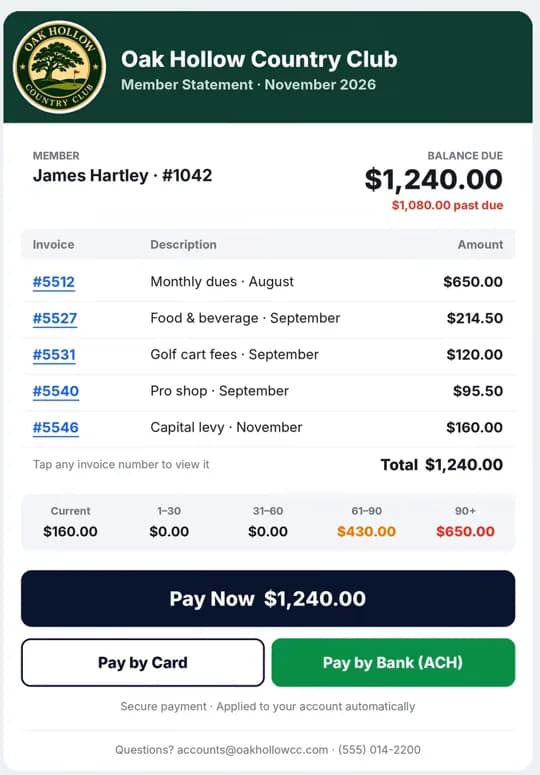
Monthly member statements with a Pay Now button, sent automatically from QuickBooks Online. Members pay by card or bank, any time.
Rated 5.0 on the QuickBooks App Store
“QuickBooks’ statements do not provide hyperlinks, so I decided to look for alternatives. I am pleased with the attentiveness and ease of use of this app integration. When we have questions, we email our rep, and he answers within 24 hours.”
“He helped to customize our statements and did a wonderful job. He is great to work with!”
Month-end shouldn't mean stuffing envelopes.
Printing statements, chasing members at the bar, waiting on checks. Your members want to pay. QLink-Pay makes it one tap.
Watch the 45-second videoThere's nothing wrong with asking for your money.
Most members aren't avoiding you. They forget, or paying is a hassle. Make it easy and ask regularly.
Sources: Payt analysis of 1.8 million invoices; Zeller Invoicing Report 2025; WalletHub survey.
How it works
Statements go out on your day
Pick a day once. Every member's statement is built from QuickBooks and emailed automatically, every month.
Members tap to see each charge
Every invoice number on the statement is a link. Dues, dining, cart fees: one tap opens the invoice.
They pay by card or bank
Pay Now on the statement or invoice. By card or bank (ACH), from a phone, at any hour.
Payments land in QuickBooks
Each payment is applied to the right invoice automatically. No data entry, no unapplied credits.
Sign in with Intuit → add your logo → pick your statement day. About 2 minutes.

Overdue members get a nudge. You don't lift a finger.
Automatic email reminders go out after the due date, each with a Pay Now link. Polite first, firmer later.
No setup fee. No monthly fee.
Connecting QuickBooks is free. The club only pays a small fee when a member pays.
Card 3.5% + $0.30 · Bank (ACH) 1%, capped at $20 · Payout fee 0.25% + $0.25 per payment. Unlimited members, statements and users. Full details in our terms.
Questions clubs ask
Do members need to log in or download an app?
No. They tap Pay Now on the statement or invoice and pay. No login, no password, no app.
Does it work with our QuickBooks?
It works with QuickBooks Online in the US. QuickBooks Desktop is not supported.
Will members see each charge: dues, dining, cart fees?
Yes. The statement lists every open invoice from QuickBooks. Each invoice number is a link, so a member can tap it and see exactly what the charge was.
Can the statements carry our club's logo?
Yes. Statements, invoices and reminder emails show your club's logo and name.
What does it cost the club?
No setup fee and no monthly fee. A fee applies only when a member pays: 3.5% + $0.30 by card, or 1% capped at $20 by bank (ACH). Plus a payout fee of 0.25% + $0.25 per payment.
Can we pass the card fee on to members?
Yes (coming soon). You will be able to pass the card fee on to members, so the club does not pay it.
Do payments go into QuickBooks by themselves?
Yes. Each payment is recorded on the right invoice in QuickBooks. Bank (ACH) payments are recorded once they clear.
Some members still pay by check. Is that a problem?
No. Record the check in QuickBooks as you do today. QLink-Pay picks up the new balance, so the member's next statement is correct and no reminder goes out for a paid invoice.
Is there a contract?
No contract and no monthly fee. You can disconnect QuickBooks at any time.
How long does setup take?
About 2 minutes. Sign in with Intuit, add your club's logo, and pick your statement day.
Is it safe?
Payments are processed by Stripe. You connect with Intuit's own QuickBooks sign-in, and QLink-Pay is approved on the QuickBooks App Store.

Treasurer by day.
Club hero by month-end.
Connect QuickBooks and send your first statements with a Pay Now button this month.
Connect QuickBooks free 5.0 on the QuickBooks App Store · No monthly feesPrefer to talk first? Book a 15-minute call