
FREE · NO MONTHLY FEE · 2 MINUTE SETUP
How QuickBooks Owners Finally Stopped Chasing Invoices — And Got Paid 40% Faster
47% of small businesses have unpaid invoices right now. QLink-Pay fixes that automatically.

See what QuickBooks users are saying ↓
TRUSTED BY QUICKBOOKS BUSINESS OWNERS
These QuickBooks Owners Made 3 Simple Changes in 5 Minutes — The Results Will Shock You.
Connect QLink-Pay to QuickBooks
Your QuickBooks. Your data. Your customers.
The 3 Secrets. Set up in 5 minutes.
Runs forever.
The second an invoice is created in QuickBooks it hits your customer’s inbox with a Pay Now button. Outstanding invoices get an instant invoice reminder the moment they are raised. One click. Paid.
QLink-Pay sends this automatically — you do nothing.
Overdue invoice emails go out automatically to every customer who hasn’t paid. Every payment reminder has a payment link embedded. No invoice chasing. No calls.
QLink-Pay tracks who is overdue and follows up automatically.
Every invoice follow up and past due notice goes out automatically — no subscription fee, no monthly cost.
A QuickBooks statement payment link goes out to every customer every month. But here’s what shocks people — every single unpaid invoice is embedded inside that statement. Clickable. Payable. One document. One click. Collect unpaid invoices without making a single call. Instantly.
QLink-Pay generates and sends this automatically every month.
No other software does this.
The statement with pay button is the feature 13,292 QuickBooks users voted for — and the only AR automation tool that delivers it.
Connect QLink-Pay to QuickBooks
Your QuickBooks. Your data. Your customers.
See it in action
What your customers receive
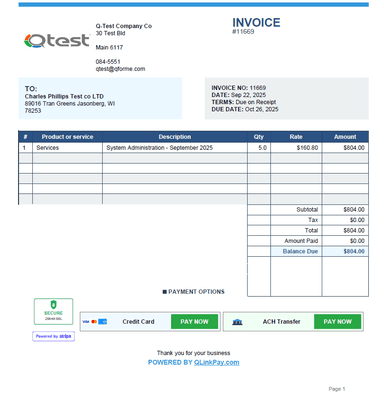
Invoice with Pay Now button
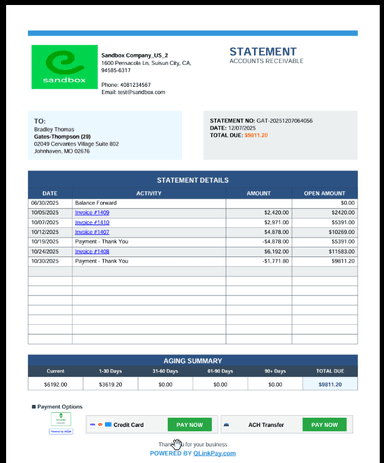
Monthly statement with payment links
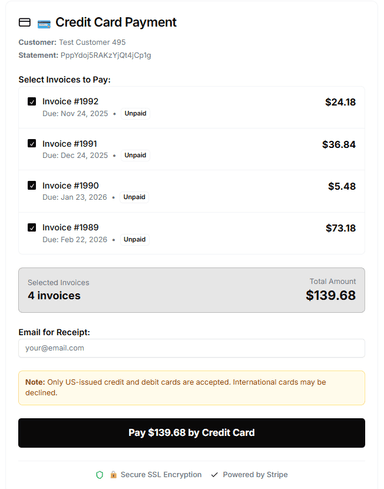
Payment portal — CC and ACH
See full demo
Connect QLink-Pay to QuickBooks
Your QuickBooks. Your data. Your customers.
From Invoice to Paid — Fully Automated
One connection to QuickBooks. Everything runs on autopilot.
Invoice Sent Instantly
Customer gets it right away with a payment button and Pay Now link.
Monthly Statements
Go out automatically every month to every customer with a pay link.
Smart Reminders
Day 1, 7, 14, 21, 30 by email and SMS until they pay.
Syncs to QuickBooks
Every payment posts back automatically. No manual entry.
Simple, transparent pricing
You only pay when your customer pays you.
3% + $0.30
per transaction
Visa · Mastercard · Amex
1% capped at $20
per transaction
ACH bank transfer · Best for large invoices
Zero monthly subscription — ever. No subscription fee. First 200 businesses get free lifetime membership. You only pay a small fee when your customer pays you.
$17,500
Average outstanding invoices per small business right now
Source: QuickBooks 2025
56%
Of small businesses are currently owed money from unpaid invoices
Source: QuickBooks 2025
174%
Faster payment when invoices include a Pay Now button
Source: Bluevine + Stripe 2025
4 hrs
Per week spent by small businesses chasing overdue payments
Source: InvoPilot 2025
Frequently asked questions
Everything you need to know before getting started.
Works with all QuickBooks Online plans — Simple Start, Essentials, Plus and Advanced.
QLink-Pay is payment reminder software that keeps sending escalating dunning reminders — Day 1, 7, 14, 21 and 30 automatically. No invoice chasing. You do nothing.
Yes. QLink-Pay is credit control software approved by QuickBooks. Payments via Stripe. 256-bit encryption. PCI compliant.
Your AR runs on autopilot from today.
Connect QLink-Pay to QuickBooks
Your QuickBooks. Your data. Your customers.